
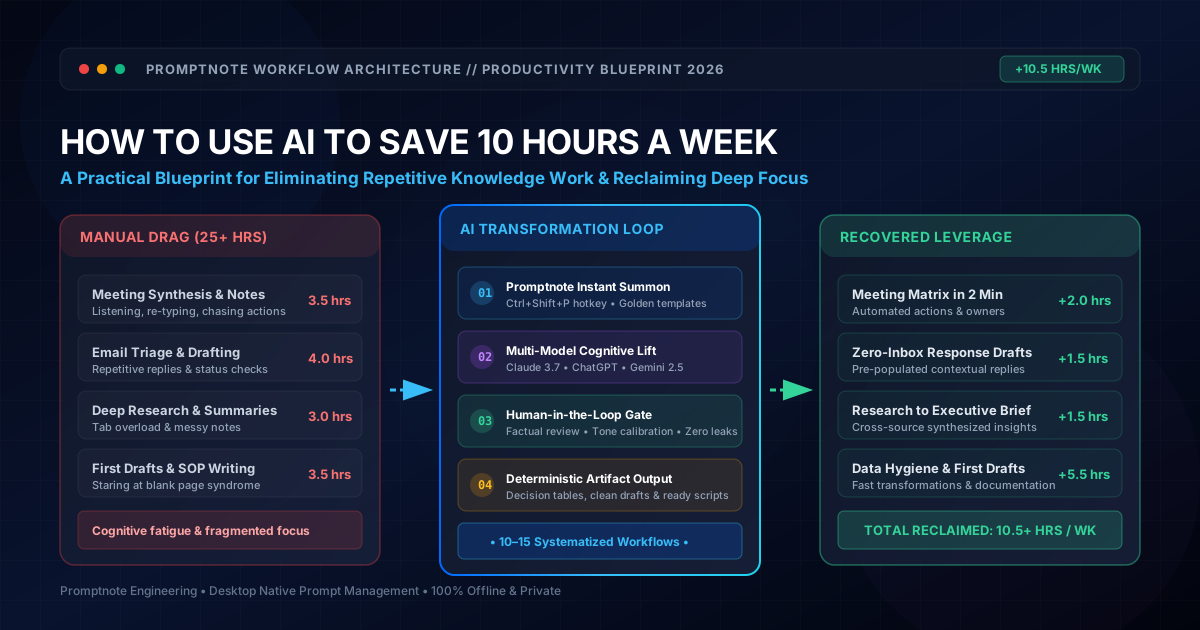
1. The Anatomy of the 50-Hour Work Week: Where Does Your Time Actually Go?
Meet Alex. Alex is a senior product lead and knowledge worker. On paper, Alex was hired to craft product strategy, interview customers, analyze market trajectories, and ship high-leverage features.
In reality, Alex’s work week is an exhausting marathon of cognitive friction. By Friday afternoon, Alex has worked 52 hours, yet feels like barely four hours were spent on creative, strategic breakthroughs. Where did the remaining 48 hours vanish?
Knowledge workers do not suffer from a lack of talent or willpower; they suffer from administrative cognitive tax. Every time you switch from deep strategic thinking to format a 12-row table, transcribe action items from a recorded Zoom call, or wordsmith a polite decline to an email, your brain undergoes severe context fragmentation.
Research in organizational ergonomics confirms that regaining deep concentration after an interruption takes an average of 23 minutes and 15 seconds. When you spend three hours scattered across 15 micro-tasks throughout the day, you don't just lose those three hours—you sabotage the focus of the remaining five.
The goal of AI is not to replace your intellect or outsource critical judgment. The goal is to act as a frictionless cognitive synthesizer—absorbing raw, unstructured information (audio, unformatted notes, email threads, messy CSVs) and instantly producing structured first drafts, leaving you free to execute high-value decision-making.
Let’s examine how Alex transformed this 50-hour grind into a calm, focused 40-hour week by systematically recovering 10.5 hours through 12 deterministic AI workflows.
2. The Weekly 10-Hour Savings Plan: The Master Audit Schedule
Time management advice often fails because it speaks in vague platitudes: "Use AI to write faster" or "Automate your inbox." To make time savings real, you need an operational timetable. Below is the exact weekly audit plan showing how a knowledge worker recovers 10+ hours between Monday morning and Friday afternoon.
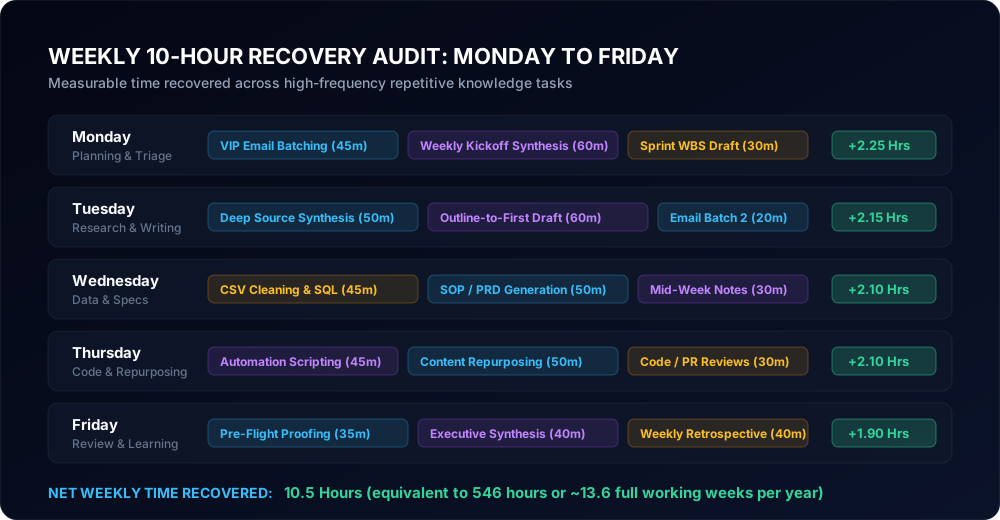
| Day | Target Workflows | Manual Time | AI-Augmented Time | Net Time Recovered |
|---|---|---|---|---|
| Monday | VIP Email Batching + Weekly Kickoff Meeting Synthesis + Sprint Scope Outline | 3 hrs 15 min | 50 min | +2.25 Hours |
| Tuesday | Deep Competitor Synthesis + First-Draft Document Authoring + Daily Triage | 3 hrs 10 min | 55 min | +2.15 Hours |
| Wednesday | Spreadsheet/CSV Hygiene + SQL/Formula Generation + Technical SOP Writing | 3 hrs 05 min | 55 min | +2.10 Hours |
| Thursday | Workflow Scripting/Automation + Content Repurposing + Code/Logic Review | 3 hrs 00 min | 50 min | +2.10 Hours |
| Friday | Pre-Flight Proofing + Executive Synthesis + Weekly Retrospective Reporting | 2 hrs 45 min | 50 min | +1.90 Hours |
| Total Weekly Time Reclaimed: | 10.50 Hours | |||
Over a 52-week working year, saving 10.5 hours each week totals 546 hours. That is the mathematical equivalent of 13.6 full forty-hour work weeks returned to your life every single year.
3. The Repeatable AI Productivity Architecture
Why do some people save 10 hours a week with AI while others waste 30 minutes arguing with a chatbot? The difference comes down to system architecture. Amateurs write one-off prompts in messy browser tabs; professionals execute a closed-loop workflow.
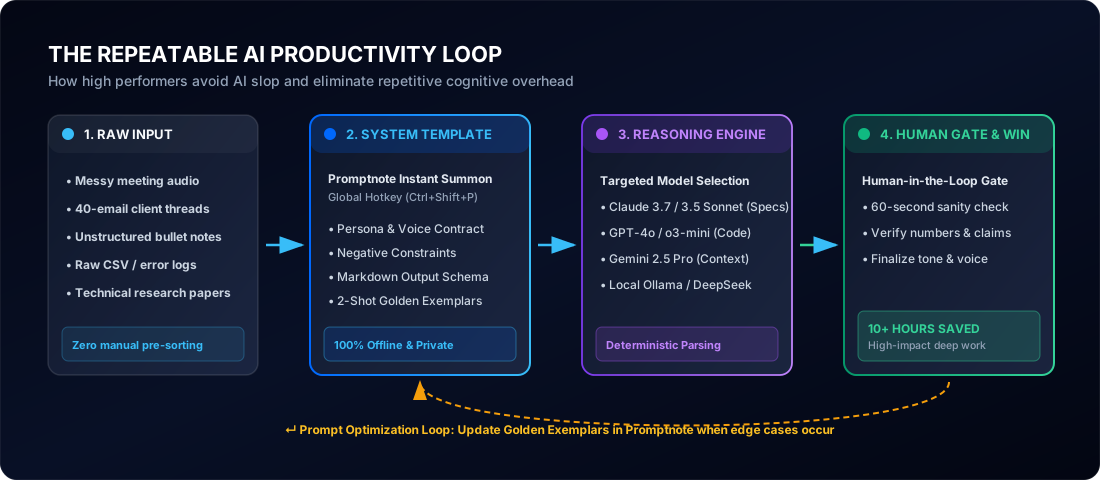
This architecture relies on four foundational rules:
- Raw Input Ingestion: Never waste time hand-formatting inputs before passing them to the AI. Feed it the raw audio transcript, the messy email thread, or the unformatted CSV directly. LLMs are premier format transformers.
- Prompt Template Standardization: Do not type prompts from scratch. Store your golden prompts in a native desktop manager like Promptnote. With a single system-wide hotkey (Ctrl + Shift + P), summon standardized templates equipped with role definitions, output schemas, and negative constraints.
- Model Specialization: Direct tasks to the right intelligence. Use Claude 3.7 / 3.5 Sonnet for nuanced human prose and engineering specs, OpenAI o3-mini or GPT-4o for math and scripting, and Gemini 2.5 Pro for processing massive 100k+ token documents.
- The 60-Second Human Gate: Never publish or send raw AI outputs. Spend 60 seconds acting as an editor-in-chief: verify numbers, confirm proper nouns, calibrate tone, and ensure zero confidential data leaks.
4. The 12 Concrete AI Workflows (Recovering 10+ Hours Step-by-Step)
Here are the 12 specific workflows Alex implemented. Every workflow breaks down the exact task, the old manual friction, the AI-powered process, a production-ready prompt template you can copy immediately, estimated weekly savings, recommended tooling, and where human scrutiny remains critical.
Workflow 1: Raw Meeting Audio to Action Matrix & Decision Log
The Task: Processing 4–6 hours of weekly team syncs, stakeholder reviews, and customer calls into crisp action items, owners, deadlines, and architectural decisions.
The Old Manual Process: Spending 30 minutes during each meeting furiously typing disjointed notes, followed by 20 minutes after the call re-reading, formatting, and emailing a summary to attendees. Total time lost: ~3 hours per week.
The AI-Powered Process: Record the call (or export the automatic transcript from Zoom, Google Meet, or Whisper). Feed the raw transcript into the AI using a structured extraction template. Within 15 seconds, receive a Markdown decision log and table of action items.
Human Review Checkpoint: Verify the names of task owners and any specific numerical commitments (e.g., budgets or target delivery dates) before broadcasting to the team.
Workflow 2: VIP Email Triage & Context-Aware Draft Generation
The Task: Triaging 40–60 non-trivial emails weekly, formulating thoughtful, context-aware replies, polite declines, and scheduling coordination.
The Old Manual Process: Re-reading long email chains three times to catch historical context, agonizing over diplomatic phrasing, and typing replies from scratch. Total time lost: ~2.5 hours per week.
The AI-Powered Process: Paste the email thread into an AI prompt that injects your communication style contract, your core availability, and your standard operating boundaries. Prompt the AI to generate two alternative draft responses (one direct/succinct, one detailed/collaborative).
Human Review Checkpoint: Always confirm attached links, dates, and ensure promises made align with current team bandwidth before pressing send.
Workflow 3: Deep Research & Competitor Synthesis with Source Anchoring
The Task: Investigating industry trends, evaluating competitor feature announcements, and synthesizing complex documentation into an executive brief.
The Old Manual Process: Opening 25 browser tabs, skimming whitepapers, copy-pasting disparate quotes into a blank Google Doc, and spending hours reconciling contradictory data points.
The AI-Powered Process: Feed raw whitepapers, competitor landing page copy, or search queries into an AI research engine using a matrix comparison prompt with strict citation constraints.
Human Review Checkpoint: Click through the primary source citations to ensure the AI did not confuse marketing hype with verified technical functionality.
Workflow 4: Bullet Points to Polished First Drafts (Overcoming Blank-Page Inertia)
The Task: Transforming fragmented thoughts, meeting notes, and bullet outlines into coherent proposals, blog posts, internal memos, or client updates.
The Old Manual Process: Staring at a blinking cursor for 45 minutes trying to find the perfect opening sentence, getting bogged down in transitions, and writing at 25 words per minute.
The AI-Powered Process: Speak or brain-dump messy bullet points into an outline, then use a "Voice Contract" prompt that mirrors your structural cadence and stylistic rules.
Human Review Checkpoint: Inject your personal anecdotes, verify that proposed metrics reflect actual targets, and smooth out any overly predictable AI rhythms.
Workflow 5: Engineering Specs & Standard Operating Procedures (SOPs) from Slack Threads
The Task: Documenting technical workflows, deployment steps, customer onboarding processes, and bug mitigation checklists.
The Old Manual Process: Postponing documentation for weeks because it feels tedious, leaving critical institutional knowledge locked in chaotic Slack channels and pull request comments.
The AI-Powered Process: Copy the messy Slack conversation or PR review thread where the engineers or operators figured out the solution, and prompt the AI to extract an ISO-grade Standard Operating Procedure.
Human Review Checkpoint: Run through the steps once personally in a staging environment to confirm no CLI flag or authorization credential was missed.
Workflow 6: Spreadsheet Hygiene, SQL Generation & Anomaly Detection
The Task: Writing complex Excel/Google Sheets formulas (XLOOKUP, REGEXEXTRACT, QUERY), writing SQL joins for customer databases, and hunting down data discrepancies.
The Old Manual Process: Spending 45 minutes on Stack Overflow trying to nest IF statements or debug a syntax error in a multi-table SQL query.
The AI-Powered Process: Provide your schema headers and describe your analytical goal in plain English. The model outputs the exact formula or validated SQL query with performance comments.
Human Review Checkpoint: Test the query on a limited dataset with `LIMIT 10` before running it across millions of production rows.
Workflow 7: Fast Technical Learning & Whitepaper Reverse-Engineering
The Task: Understanding new frameworks, API specifications, regulatory policies (e.g., GDPR, EU AI Act), or machine learning architectures.
The Old Manual Process: Reading a dense 40-page academic paper or technical specification from front to back, battling through academic jargon to find the two actionable ideas that matter to your project.
The AI-Powered Process: Upload the PDF into an AI model with an extraction prompt that demands analogies, architectural diagrams, trade-off comparisons, and direct code implementations.
Human Review Checkpoint: Compare the model's breakdown against the paper’s benchmark tables to verify that claims of performance gains weren't taken out of context.
Workflow 8: Repetitive Automation Scripts & Regex Generators
The Task: Batch renaming files, converting 500 JSON objects to CSV, scraping structured data from HTML, or writing regular expressions for form validation.
The Old Manual Process: Doing repetitive manual copy-pasting for an hour, or wrestling with cryptic Regex syntax errors on regex101 for half the morning.
The AI-Powered Process: Prompt an AI model to generate a self-contained, typed Python or Bash script with comprehensive error handling and automated test cases.
Human Review Checkpoint: Always inspect file-handling and shell-execution scripts before running them locally. Never run scripts with administrative privileges without reviewing every line.
Workflow 9: Multi-Channel Content Repurposing Pipeline
The Task: Converting a deep 3,000-word technical blog post or podcast recording into LinkedIn thought-leadership carousels, newsletter editions, and X threads.
The Old Manual Process: Re-reading the entire piece multiple times, wrestling with character counts, and spending three separate afternoons formatting posts for different platforms.
The AI-Powered Process: Feed the published source article into an omnichannel transformation prompt that understands platform-specific algorithmic conventions.
Human Review Checkpoint: Ensure the extracted snippets retain the nuanced context of the original technical claims and don't oversimplify complex edge cases into clickbait.
Workflow 10: Pre-Flight Proofing, Tone Calibration & Jargon Elimination
The Task: Reviewing client deliverables, team announcements, or public essays for grammar, conciseness, structural logic, and defensive corporate fluff.
The Old Manual Process: Reading a 10-page document four times, catching typos by eye, and doubting whether the tone sounds too defensive, robotic, or overly casual.
The AI-Powered Process: Run a systematic editorial pre-flight checklist prompt that scores the text on clarity and identifies passive voice, wordiness, and structural contradictions.
Human Review Checkpoint: Decide whether stylistic recommendations enhance your authentic voice or make the prose feel too sterile and homogenized.
Workflow 11: Customer Support Ticket Triage & FAQ Synthesis
The Task: Answering recurring client and user questions, categorizing support inquiries by urgency, and expanding the internal knowledge base.
The Old Manual Process: Manually searching through past sent emails or Slack channels to remember how a tricky customer problem was resolved three months ago.
The AI-Powered Process: Feed recent ticket logs into an AI clustering prompt that groups issues by root cause and drafts reusable canned responses for customer success teams.
Human Review Checkpoint: Confirm that software troubleshooting steps are accurate for the current software release version.
Workflow 12: Turning Ambiguous Brain-Dumps into Work Breakdown Structures (WBS)
The Task: Taking a high-level strategic initiative (e.g., "Migrate billing system to Stripe" or "Redesign our onboarding funnel") and breaking it down into actionable Jira epics, user stories, and acceptance criteria.
The Old Manual Process: Spending four hours in project management software typing out 30 individual ticket descriptions, acceptance criteria, and dependency maps.
The AI-Powered Process: Feed the raw project overview into an agile decomposition prompt that generates a complete Work Breakdown Structure formatted for direct import into Jira, Linear, or GitHub Issues.
Human Review Checkpoint: Review story point estimates with engineering leads during sprint planning to ensure dependencies match architecture reality.
5. Beginner vs. Advanced Workflows: The 3-Tier AI Maturity Ladder
Your ability to save time with AI evolves through three distinct operational phases. Knowing where you are on this ladder prevents you from biting off more complexity than your current workflow can sustain.
- Interface: Web chats (ChatGPT, Claude, Gemini web apps).
- Prompt Style: Zero-shot or single-shot conversational prompts.
- Tasks: Rewriting emails, spellchecking, generating ideas, basic formulas.
- Friction: Manual copy-pasting between browser tabs; prompts must be retyped every day.
- Average Time Saved: 2–3 hours per week.
- Interface: Native desktop manager (Promptnote) + IDE Copilots (Cursor) + API scripts.
- Prompt Style: Parameterized golden templates with voice contracts and few-shot exemplars.
- Tasks: Closed-loop meeting synthesis, data cleaning, automated PRD generation, codebase refactoring.
- Friction: Zero tab switching; global hotkey invocation directly inside Slack, Docs, or email.
- Average Time Saved: 10–14 hours per week.
The leap from saving 2 hours a week to saving 10+ hours occurs when you stop treating AI as a chat partner and start treating it as a deterministic operating system component. That requires saving your best prompts locally so you can trigger them instantly without breaking flow state.
6. The 5 Costly AI Mistakes That Actually Waste Your Time
It is remarkably easy to lose more time than you save if you fall into these five common psychological traps:
The Endless Prompting Death Loop
Typing a lazy one-sentence prompt, getting a generic answer, and spending 25 minutes debating with the model. If a prompt fails twice, stop. Rewrite the prompt with explicit structural constraints, or do the task manually.
The Context Pollution Trap
Using a single, never-ending chat thread for three weeks across five different projects. Old instructions bleed into new tasks and degrade model performance. Always start fresh sessions for distinct tasks.
Automating Non-Deterministic Tasks
Attempting to outsource high-stakes strategic negotiations or nuanced interpersonal feedback to AI. These require human empathy and political intuition; AI will produce tone-deaf, bland platitudes.
Copy-Pasting Without Reading
Sending an unread AI draft to a client containing synthetic hallucinated metrics or dead links. The resulting damage to your professional credibility takes dozens of hours to repair.
7. Privacy, Security & Data Hygiene Protocols
Saving 10 hours a week is useless if you violate client non-disclosure agreements or leak proprietary intellectual property into public training sets. Every professional using AI must enforce four non-negotiable security protocols:
- Zero Model Training: Ensure your settings or API subscriptions explicitly opt out of training. In consumer tiers, check settings to disable model improvement on your inputs.
- Token Scrubbing: Replace client company names, customer emails, API keys, and exact revenue numbers with generic tokens (e.g., `Client_Alpha`, `User_123`, `$XX,XXX`) before feeding text to models.
- Local-First Prompt Storage: Avoid storing your company’s proprietary prompt engineering library in cloud-based note apps. Use local desktop managers like Promptnote that store your templates locally on your machine.
- Regulated Data Isolation: Never paste healthcare records (HIPAA), payment card details (PCI-DSS), or GDPR-restricted European resident identifiers into cloud AI services without approved enterprise Business Associate Agreements (BAAs).
8. The 5-Minute Automation Audit Checklist
How do you decide whether a new recurring task should be handed over to an AI workflow? Run it through this simple 5-step checklist before investing time into building a prompt template:
- 1. High Frequency: Does this task recur at least 3 times a week or consume more than 45 minutes in a single sitting? (If no, do it manually).
- 2. Clear Input & Output Boundaries: Can you clearly define what raw inputs go in (e.g., transcript, bullet list) and what the finished output should look like (e.g., table, Markdown doc)?
- 3. Tolerant of First-Draft Imperfection: Does getting a 90% complete first draft in 15 seconds provide significant leverage, even if it requires a 60-second editorial pass?
- 4. Measurable Verification Gate: Can a human visually audit and verify the accuracy of the output in under two minutes?
- 5. Reusable Template Potential: Can the prompt be parameterized so you or your team can trigger it repeatedly with a single hotkey?
9. Frequently Asked Questions
Is saving 10 hours a week with AI realistic, or is it marketing hype?
It is completely realistic if applied systematically to repetitive administrative and synthesis tasks rather than attempting to automate whole creative or strategic jobs. Knowledge workers spend 20–30% of their work week on manual meeting notes, email drafting, status updates, document formatting, and initial research. Offloading these defined micro-tasks saves 1.5 to 2.5 hours per business day, comfortably exceeding 10 hours weekly.
Which AI model should I use for daily productivity workflows?
Different tasks benefit from specialized models: Claude 3.7 / 3.5 Sonnet excels at structured long-form writing, technical specs, and nuanced human-sounding email drafts; OpenAI models like GPT-4o and o3-mini are formidable for Python scripting, data transformations, and math; Gemini 2.5 Pro excels at massive context windows (such as processing 300-page PDFs or 2-hour audio transcripts). Local models via Ollama can handle confidential data without internet transmission.
How do I prevent hallucinations and errors when automating with AI?
Always implement a strict Human-in-the-Loop review gate. Ground the model by providing explicit source text (closed-book prompting) rather than asking open-ended questions from memory. Require the model to cite exact lines, numbers, or timestamps, and use negative constraints (e.g., 'If the document does not contain this answer, state UNKNOWN').
How can I store and summon my AI prompts quickly across daily desktop apps?
Rather than copying and pasting from text files or hunting through chat histories, native desktop prompt managers like Promptnote allow you to organize, version control, and instantly summon your parameterized prompt templates using a global system shortcut (Ctrl + Shift + P) directly into any application.
How do I safeguard company and personal privacy when using AI?
Never feed customer personally identifiable information (PII), API keys, passwords, or confidential financial records into public consumer AI models whose default settings train on user conversations. Use enterprise or API plans that feature Zero Data Retention (ZDR), sanitize company names and employee identifiers into generic placeholders, and keep proprietary prompt templates stored offline on your local machine.
What is the single biggest mistake people make when trying to save time with AI?
The 'prompt editing death loop'—typing a lazy one-sentence prompt, receiving a generic or flawed response, and spending 30 minutes manually tweaking the text or arguing with the chatbot. True time savings come from investing 10 minutes once to build a robust, parameterized template with persona, constraints, and golden exemplars, and reusing it indefinitely.
10. Related Engineering & AI Productivity Guides
How to Write the Best Prompt: The Complete Guide
Master the exact frameworks, context rules, role definitions, and few-shot exemplars that guarantee reliable AI outputs.
Read Guide →How to Write Instructions for Your AI Agents
Learn how to design multi-step agent loops, verification gates, and error recovery protocols that execute reliably.
Read Guide →What Is Loop Engineering? Beyond Simple Prompts
Transition from fragile single-turn questions to resilient closed loops that plan, execute, verify, and complete complex workflows.
Read Guide →