1. The Tale of Two Prompts: How One Question Spawned Two Different Realities
Picture two software engineers, Maya and Liam, sitting in adjacent chairs during a late-night product design sprint. Both open their AI coding and writing assistants, powered by the exact same frontier model. Both type the exact same seven-word prompt into the chat window:
Liam hits Enter. His screen generates:
"Rain drummed steadily against the venetian blinds of my second-story office as midnight chimed across the rain-slicked city."
It is clean, atmospheric, and familiar. It hits every classic noir trope squarely on the head. You have read variations of this sentence a hundred times.
Maya hits Enter on her screen. Her model produces something strikingly different:
"The neon skyline bled into the gutter like crushed plums, and my cheap cigarette tasted of unpaid rent and yesterday's bad decisions."
Visceral. Gritty. Unconventional. An evocative leap of metaphor that catches you completely off guard.
Liam blinks at Maya's screen. "Wait a minute. We used the exact same prompt on the exact same model. Why is mine a textbook cliché while yours sounds like Raymond Chandler had a fever dream?"
The difference had nothing to do with prompt engineering, system instructions, or secret API keys. Liam had his workspace set to a Temperature of 0.1, while Maya was running at a Temperature of 1.1.
That single decimal number is the invisible thermostat of artificial intelligence. In this guide, we will unpack exactly what temperature means in Large Language Models (LLMs), how it works mathematically without overwhelming you with jargon, why it fundamentally alters AI behavior, and how you can pick the perfect temperature for every task you tackle.
2. What Is Temperature in Large Language Models? (The Simple Explanation)
To understand temperature, you must first dispel a common illusion: Large Language Models do not write sentences as unified thoughts. They predict text one word (or token) at a time.
When an AI generates text, it acts like an ultra-sophisticated autocomplete engine. At every single step, the model looks at everything written so far, scans its vast neural network, and computes a list of candidate words that could reasonably come next. Crucially, each candidate word is assigned a probability score.
The Core Definition of LLM Temperature
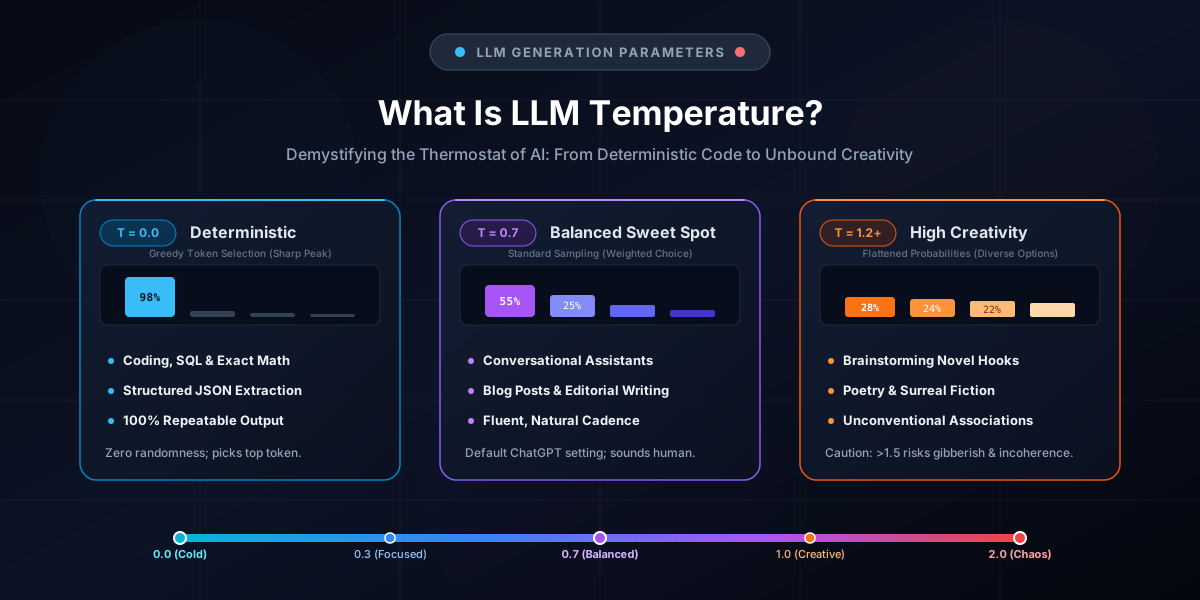
Temperature is a generation hyperparameter (typically ranging from 0.0 to 2.0) that controls how much risk the AI is allowed to take when choosing among candidate tokens. It determines whether the model strictly picks the safest, most obvious mathematical favorite or gambles on lower-probability, unexpected words.
The "Café Menu" Analogy
Imagine you walk into a bakery every morning to order breakfast:
- At Temperature = 0.0 (The Strict Habitual Eater): You look at the menu, identify your #1 favorite pastry (a plain croissant with an 85% approval rating), and order it every single day without fail. You never experience an unpleasant surprise, but your breakfast is completely predictable.
- At Temperature = 0.7 (The Adventurous Foodie): You usually get the croissant, but 20% of the time you try the almond danish, and 10% of the time you try the cardamom bun. Your mornings have pleasant variety while staying consistently delicious.
- At Temperature = 1.8 (The Chaotic Roulette): You close your eyes and throw a dart at the menu board. Today you might get a cinnamon roll, tomorrow you might get a spoonful of raw baking soda, and the next day a napkin. Anything on the board has an equal chance of being picked.
Why Is It Called "Temperature"? (The Physics Connection)
The term is not just a poetic metaphor—it comes directly from statistical thermodynamics and the Boltzmann distribution.
In physics, when physical matter is cold (low thermal energy), molecules freeze in place and settle into their lowest possible energy state—rigid, structured, and predictable (like ice crystals). When thermal energy increases (high temperature), molecules vibrate vigorously, bounce around chaotically, and explore high-energy, unpredictable states (like boiling steam).
AI researchers adopted this exact formula to control the kinetic "energy" of token selection in neural networks.
3. Under the Hood: Next-Token Prediction, Logits, and Softmax
To truly master prompt engineering and API tuning, it helps to see the three-step assembly line that happens inside a Transformer model milliseconds before a word appears on your screen.
Step 1: The Transformer Outputs Raw Logits
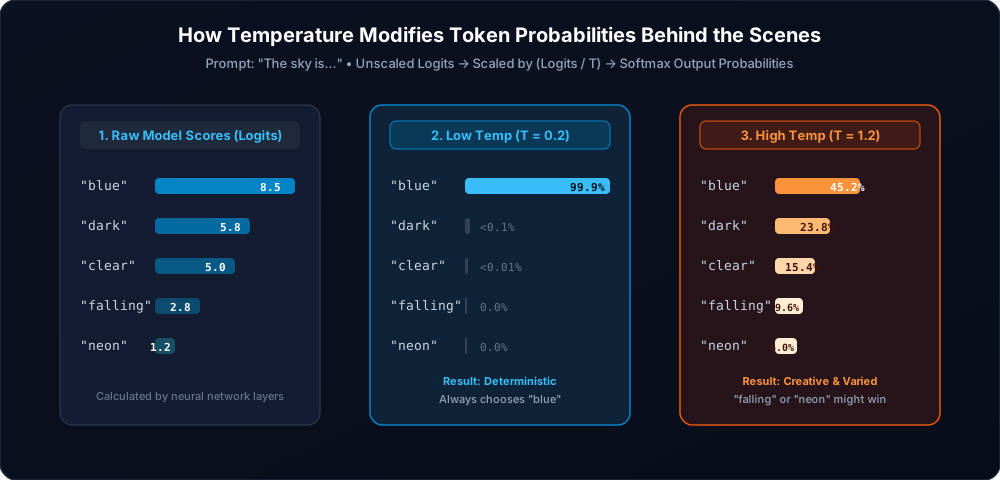
Suppose the model has processed the partial sentence: "The sky is...". The model evaluates its entire vocabulary (often 50,000 to 128,000+ tokens) and outputs a raw numerical score called a logit for every candidate token:
"blue"→ Logit: 8.5 (Strong favorite)"dark"→ Logit: 5.8 (Reasonable alternative)"clear"→ Logit: 5.0 (Viable alternative)"falling"→ Logit: 2.8 (Unlikely, poetic/metaphorical)"neon"→ Logit: 1.2 (Rare, sci-fi context)
Step 2: Temperature Divides the Logits
Before these raw numbers are converted into percentages, the model divides every single logit by the Temperature ($T$):
Step 3: Softmax Calculates Final Probabilities
The scaled numbers are passed through the Softmax function, which maps arbitrary numbers into a valid probability distribution where all values add up to exactly 100% (or 1.0):
The Mathematical Temperature Formula
P(token_i) = exp(Logit_i / T) / Σ exp(Logit_j / T)
Where exp() is the exponential function (ex). Notice what happens when you divide by different values of T:
-
When Temperature is very low ($T = 0.2$): Dividing by a small fraction ($0.2$) multiplies the differences between logits by 5x. The gap between
8.5and5.8becomes massive. After softmax,"blue"gets a 99.9% probability, while"dark"collapses to less than 0.1%. The model virtually always picks"blue". -
When Temperature is standard ($T = 0.7$): The probabilities reflect the model's natural training distribution.
"blue"has roughly 65%,"dark"has 22%, and"clear"has 10%. The model usually picks"blue", but retains natural variety. -
When Temperature is high ($T = 1.4$): Dividing by $1.4$ shrinks the numerical gap between logits. The distribution flattens into an egalitarian plain.
"blue"drops to 35%, while"falling"and"neon"jump to 15% and 12%. Now the model has a very realistic chance of rolling the dice and outputting: "The sky is neon..."
This explains why setting $T = 0$ is often called "Greedy Decoding" or Argmax: the model skips the dice roll entirely and simply grabs the #1 highest-ranked token with 100% certainty.
4. The Temperature Spectrum: From Absolute Zero to Pure Chaos (0.0 to 2.0)
Most modern LLM APIs (OpenAI GPT-4o, Anthropic Claude 3.7, Google Gemini 2.5) support temperature values from 0.0 up to 2.0. Here is how your AI behaves across the dial:
The 5 Temperature Zones
Frozen (Deterministic)
Zero randomness. Strictly chooses the highest-probability token every step.
Best For:Code generation, SQL queries, regex, math calculations, JSON extraction, unit test generation.
Focused (Analytical)
High factual adherence with just enough stylistic flexibility to avoid robotic phrasing.
Best For:Document Q&A, summarizing meeting transcripts, technical documentation, language translation.
Balanced (Default)
The industry default (ChatGPT & Claude). Natural human cadence, engaging tone, strong coherence.
Best For:Blog posts, customer support chatbots, executive emails, general knowledge explanations.
Creative (Divergent)
Encourages non-obvious token combinations, metaphorical leaps, and unique perspectives.
Best For:Brainstorming startup names, marketing hooks, poetry, fiction dialogue, creative roleplay.
Chaos (Hallucination Zone)
Probabilities are almost totally flattened. Rare tokens win frequently. Grammar collapses.
Warning:High risk of hallucinated facts, repetitive loops, broken syntax, and nonsensical words.
5. Side-by-Side Prompt Showdowns: Coding, Research, Summaries & Creative Fiction
To see how temperature works in the real world, let's examine identical prompts sent to the same model under Low Temperature ($T = 0.1$) versus High Temperature ($T = 1.1$) across 5 distinct domains.
Outcome: Canonical, reliable, production-ready. Uses the industry-standard regex pattern without extraneous fluff.
Outcome: Invented an unnecessary dnspython dependency, incomplete regex, and risky error handling. Overly "creative" for strict logic.
Outcome: 100% compliant with the schema, valid JSON syntax, zero editorializing.
Outcome: Altered schema key names, injected descriptive strings instead of numbers, breaking downstream API parsers.
Outcome: Literal, generic, and uninspired. Every domain name is likely already registered.
Outcome: Evocative, memorable, punchy, and distinctive. Perfect for branding.
Outcome: Objective, disciplined, bullet-proof factual adherence.
Outcome: Fluffy, dramatic storytelling that hides key deadlines and action items.
Outcome: Functional but flat and repetitive. Feels like an instruction manual.
Outcome: Deeply poetic, evocative, visually rich, and memorable.
6. The Definitive Temperature Cheat Sheet & Decision Matrix
Bookmark this table whenever you build prompts, configure agents, or set up API calls in tools like Promptnote:
| Use Case / Domain | Recommended Temperature | Recommended Top-p | Why This Works | Risk If Set Wrong |
|---|---|---|---|---|
| Code Generation & SQL | 0.0 – 0.2 |
1.0 (or 0.95) |
Ensures exact syntax, standard library functions, and deterministic logic. | High temp invents fake package imports and broken syntax. |
| Structured JSON & Schema Extraction | 0.0 – 0.1 |
1.0 |
Guarantees exact key matching and valid JSON syntax without conversational filler. | High temp inserts markdown comments or modifies key names. |
| Math, Logic & Unit Tests | 0.0 |
1.0 |
Mathematical reasoning requires greedy search on deductive steps. | Any temperature >0.3 introduces arithmetic hallucinations. |
| Document Q&A & RAG Search | 0.2 – 0.4 |
0.9 |
Locks the model to source context while allowing fluid natural sentence formation. | High temp extrapolates and fabricates ungrounded claims. |
| Executive Summarization | 0.3 – 0.5 |
0.9 |
Balances concise brevity with grammatical elegance without altering factual data. | High temp embellishes or misses critical bullet points. |
| Customer Support Chatbots | 0.5 – 0.7 |
0.9 |
Maintains policy compliance while sounding empathetic and human. | Low temp sounds robotic; high temp makes false promises. |
| Blog Posts & Editorial Content | 0.7 – 0.8 |
0.95 |
The sweet spot for engaging rhythm, dynamic transitions, and readability. | Low temp produces repetitive, boring sentence structures. |
| Brainstorming & Marketing Hooks | 0.9 – 1.1 |
0.95 |
Encourages lateral thinking, unexpected analogies, and novel phrasing. | Low temp returns only predictable, overused clichés. |
| Poetry, Worldbuilding & Fiction | 1.0 – 1.3 |
0.98 |
Unlocks rich sensory metaphors, varied character voices, and surreal imagery. | Setting >1.5 results in grammar collapse and gibberish. |
7. The 5 Biggest Myths About LLM Temperature (Debunked)
Myth 1: "Higher Temperature Makes the AI Smarter."
Fact: Temperature has zero impact on model intelligence, reasoning capacity, or factual knowledge. A model trained on 10 trillion tokens knows the same facts whether $T=0.1$ or $T=1.9$. Temperature only dictates how the model samples from its probability distribution. Cranking up temperature does not make the AI a genius; it makes it an erratic gambler.
Myth 2: "Temperature = 0 Completely Eliminates Hallucinations."
Fact: If an AI has incorrect training data, ambiguous prompt context, or faulty reasoning steps, it will happily hallucinate at Temperature 0.0 with 100% mathematical confidence. Temperature = 0 eliminates stochastic randomness, not epistemological error.
Myth 3: "Temperature = 0 Is 100% Deterministic on All Cloud APIs."
Fact: In practice, sending the exact same prompt with $T=0.0$ to commercial APIs (OpenAI or Anthropic) can still occasionally return slightly different outputs. Why?
- GPU Non-Associative Floating Point Math: Modern GPU clusters parallelize matrix multiplications across thousands of tensor cores. In 16-bit floating point math ($FP16$ / $BF16$), $(A + B) + C eq A + (B + C)$ at the 7th decimal place due to rounding errors. When logits are tied at $8.5000001$ vs $8.5000002$, rounding flips the winner.
- Mixture-of-Experts (MoE) Routing: Requests are dynamically dispatched across different server clusters running varying batch sizes and quantized hardware kernels.
Myth 4: "Temperature Is the Only Setting Controlling AI Creativity."
Fact: Temperature is just one instrument in the orchestra. Generation behavior is co-governed by Top-p (nucleus sampling), Top-k, Frequency Penalty, Presence Penalty, and the System Prompt itself.
Myth 5: "You Can't Change Temperature in ChatGPT."
Fact: While the basic ChatGPT web UI hides the temperature slider to keep things simple for mainstream consumers (locking it to ~0.7), you can explicitly adjust temperature using the OpenAI Playground, Custom GPT Configuration, developer APIs, or by instructing the model directly in your system prompt (e.g., "Adopt a deterministic, strictly literal persona with zero creative divergence").
8. Temperature vs. Other Hyperparameters: Top-p, Top-k & Penalties
When configuring AI models in tools like Promptnote or writing production code, you will frequently see Temperature alongside other sampling controls. Here is how they interact:
1. Temperature vs. Top-p (Nucleus Sampling)
While Temperature reshapes the slope of the probability distribution across all words, Top-p (also called nucleus sampling) sets a cumulative probability threshold that slices off the long tail of low-probability words completely.
- Top-p = 0.9 means: Sort all candidate tokens from highest to lowest probability, add them up until their cumulative sum reaches 90%, and discard the remaining bottom 10% completely. The model will only sample from that top 90% pool.
- Top-p = 0.1 means: Only sample from the top 10% probability mass (very conservative).
The Golden Rule: The "Double Filter" Trap
Both OpenAI and Anthropic recommend altering Temperature OR Top-p, but not both at the same time. If you set $T = 0.2$ and $Top-p = 0.1$, you create an ultra-aggressive double filter that starves the model of candidate tokens, leading to awkward repetition and premature sentence termination.
2. Top-k Sampling
Popularized by models from Google and Anthropic, Top-k is a hard integer cutoff. If you set Top-k = 40, the model will only consider the top 40 most likely tokens, discarding the remaining 100,000+ words regardless of their probabilities.
3. Frequency and Presence Penalties
If your model gets stuck in repetitive loops at low temperatures, these penalties modify token logits during generation:
- Frequency Penalty (0.0 to 2.0): Penalizes tokens based on how many times they have already appeared in the output. Great for preventing repeated words and phrases.
- Presence Penalty (0.0 to 2.0): Penalizes a token simply if it has appeared at least once, encouraging the model to introduce fresh topics and vocabulary.
4. The Seed Parameter
Most modern APIs now support a seed integer (e.g., seed=42). When combined with low temperature and consistent system prompts, pinning the seed allows developers to achieve near-deterministic, reproducible responses for automated evals and unit tests.
9. How to Configure Temperature in Code & Prompt Management
Here is how you adjust temperature in production across leading SDKs:
Python: OpenAI, Anthropic & Google Gemini
Managing Temperature Across Your Prompt Library
When building complex workflows with dozens of specialized prompts, hardcoding temperature in scattered scripts quickly becomes a maintenance nightmare.
With modern prompt management tools like Promptnote, you can attach optimal temperature, top-p, and system personas directly to every prompt template in your native workspace. That way, your SQL generators always run at T = 0.0, your customer support replies stay steady at T = 0.6, and your marketing brainstormers fire at T = 1.0 with a single click.
10. Frequently Asked Questions (FAQ)
What is temperature in an LLM in simple terms?
Temperature is a setting that controls how much randomness and risk an AI model takes when selecting the next word. A low temperature (0.0 to 0.3) forces the model to pick only the most probable, mathematically favored words, resulting in rigid, predictable, and factual answers. A high temperature (0.8 to 1.2) flattens token probabilities, allowing less likely, unexpected words to be chosen, creating creative, diverse, and novel responses.
What does temperature do in ChatGPT?
In ChatGPT, temperature defaults around 0.7, which offers a balance between fluent human cadence and factual accuracy. When you adjust temperature via the OpenAI API or OpenAI Playground, lowering it to 0.0 makes ChatGPT act like a deterministic code compiler or data extractor, while raising it to 1.0+ turns ChatGPT into an imaginative brainstormer or poetic writer.
What is the best temperature for coding and math prompts?
The recommended temperature for coding, SQL queries, regex generation, and exact mathematical calculations is 0.0 to 0.2. In coding, syntax and logic have strict correct answers; you do not want the model to be "creative" or invent hallucinated library imports.
What is the difference between temperature and Top-p?
Temperature changes the shape of the entire probability curve by dividing raw logit scores (flattening or steepening the distribution), whereas Top-p (nucleus sampling) truncates the tail by only considering the smallest group of top tokens whose cumulative probability reaches threshold 'p' (e.g., top 90%). Both affect randomness, but it is best practice to adjust only one at a time.
Does temperature = 0 guarantee 100% deterministic outputs?
Theoretically yes (it forces greedy search), but in production cloud APIs (like OpenAI or Anthropic), non-determinism can still occur due to floating-point non-associativity across parallel GPU clusters, dynamic batch scheduling, and Mixture-of-Experts (MoE) routing across multiple servers.
Can LLM temperature be negative?
No. Temperature cannot be negative or zero in the mathematical denominator ($Logit / T$). In API implementations, when you set temperature = 0.0, the software intercepts the value and switches to an Argmax / Greedy decoding algorithm instead of dividing by zero.