
1. Why "It Looked Fine" Is Not an Evaluation
Here is a scenario most teams will recognise. Someone writes a prompt to summarise customer interviews, runs it once, and the answer looks sharp. It goes into the team's shared doc. A week later a colleague uses it on a different batch of notes and gets a vague, bullet-point mush that misses the one complaint that mattered. Nobody changed the prompt. So what went wrong?
The prompt was never evaluated. It was run, once, on one input, and the output was judged by eye. That tells you the prompt can work. It tells you nothing about whether it will work next time, for someone else, on different data.
Evaluating a prompt means looking at the instructions themselves and asking whether a capable model, with no access to what is in your head, could reliably do what you want. That is a different question from "was this answer good?", and it is the one that saves you from re-writing the same prompt every month.
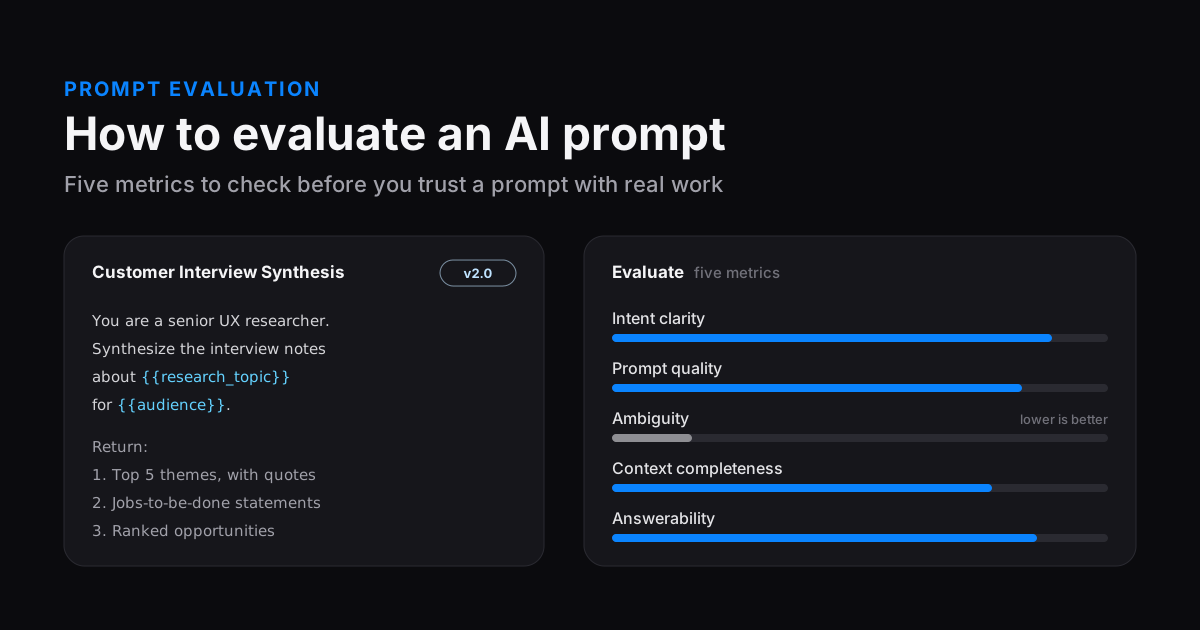
To evaluate an AI prompt, judge it on five metrics:
- Intent clarity: is the goal and the deliverable obvious?
- Prompt quality: is it well structured, with a defined output format?
- Ambiguity: could any instruction be read two ways? (Lower is better.)
- Context completeness: does the model have the facts, audience and constraints it needs?
- Answerability: can a model actually produce this from what it was given?
Fix the weakest metric first, re-check, then test the prompt on a few fixed inputs and compare it with the previous version.
The rest of this guide unpacks each metric, gives you a rubric to score prompts by hand, and walks through real rewrites. Near the end we show how we built the same checks into PromptNote's prompt evaluation tool, but everything here works with a notepad and any chat model.
2. Prompt Evaluation vs. Output Evaluation
There are two layers to "is this prompt any good?", and they are easy to blur together.
- Prompt evaluation looks at the instructions. Is the goal clear? Is anything missing or contradictory? Could a model answer it at all? You can do this before you run anything.
- Output evaluation looks at what the model produced, against success criteria you defined up front: accuracy, format, tone, length, whether it used the source material. This is what AI teams usually mean by "evals".
You need both. Prompt evaluation is cheap and fast, and it catches most problems that come from the prompt itself: a missing audience, a fuzzy deliverable, two instructions that fight each other. Output evaluation catches what only shows up in practice, like a model that ignores your length limit or falls apart on messy input.
Anthropic's prompting guide suggests a useful mental test that sits right between the two: show your prompt to a colleague who has no context on the task and see whether they could follow it. If they would be confused, the model probably will be too (Anthropic, "Be clear and direct"). The five metrics below are a structured version of that colleague test.
3. The Five Prompt Evaluation Metrics
Each metric asks one question. Together they cover the ways a prompt usually fails: the model doesn't know what you want, doesn't know how you want it, could read you two ways, lacks the facts to do it, or is being asked for something it cannot do.
| Metric | The question it asks | A weak prompt looks like | Typical fix |
|---|---|---|---|
| Intent clarity | Is it obvious what the prompt is for and what "done" looks like? | "Help me with my landing page." | State the task with a concrete verb and name the deliverable. |
| Prompt quality | Is it organised so the model can follow it? | One run-on paragraph mixing data, rules and the request. | Separate role, context, task, constraints and output format. |
| Ambiguity (lower is better) | Could any instruction reasonably mean two things? | "Make it short and detailed." "Use a professional tone." | Replace adjectives with measurable limits and examples. |
| Context completeness | Does the model have the facts it needs, or must it guess? | "Write an email to the customer about the delay." | Add who, what, why, the audience and the source material. |
| Answerability | Can a model actually produce this from what it was given? | "Tell me why our churn went up last month" with no data attached. | Supply the inputs, narrow the scope, or allow "I don't know". |
3.1 Intent Clarity: Does the Prompt Say What It Is For?
Intent clarity measures how easily a reader can tell the goal of the prompt and the shape of a successful answer. It is the metric people overrate their own prompts on most, because they know the goal. The model only has the text.
A clear intent usually has three parts: an action verb (summarise, rewrite, classify, compare, draft), an object (these interview notes, this function, the attached contract), and a purpose (so the product team can pick next quarter's priorities). The purpose is the part most often missing, and it is the one that lets the model make sensible trade-offs you didn't spell out.
- Ask yourself
- If someone read only the first two sentences, would they know what to produce?
- Red flags
- "Help me with…", "Thoughts on…", "Do something with this", several unrelated asks in one prompt.
- Quick fix
- Open with one sentence: "Your task is to [verb] [object] so that [purpose]."
3.2 Prompt Quality: Is It Built So a Model Can Follow It?
Prompt quality is about structure and craft rather than content. A high-quality prompt separates its parts so instructions are not confused with data, puts the request where it cannot be missed, and defines the output format. OpenAI, Anthropic and Google all recommend some version of the same habits: use delimiters or tags to separate instructions from input text, be specific about the format you want, and give examples when the format matters (OpenAI, Google Gemini).
- Ask yourself
- Could you point to where the role, the context, the task, the rules and the output format each live?
- Red flags
- Pasted data with no boundary around it, no output format, rules scattered through the text, the actual question buried in the middle.
- Quick fix
- Use labelled sections or tags like
<notes>…</notes>, and end with an explicit "Return:" block.
3.3 Ambiguity: Could the Model Read It Two Ways?
Ambiguity is the one metric where a lower score is better. It measures how much room the prompt leaves for a different, equally reasonable interpretation. Ambiguity is sneaky because each word looks fine on its own. "Summarise the key points" is clear until you ask: how many points? Key to whom? A paragraph or bullets?
The usual culprits are subjective adjectives (professional, engaging, short, detailed), undefined references ("the usual format", "our style"), and instructions that pull against each other ("be thorough but keep it brief").
- Ask yourself
- For each instruction, could two smart people produce noticeably different answers?
- Red flags
- Adjectives without a yardstick, "etc.", pronouns with no clear referent, conflicting limits.
- Quick fix
- Swap adjectives for numbers and examples: not "short", but "under 120 words"; not "professional", but "plain English, no exclamation marks, like a note to a senior colleague".
3.4 Context Completeness: Does the Model Have What It Needs?
A model knows a lot about the world and nothing about your situation. Context completeness measures whether the prompt supplies the specifics the task depends on: who the audience is, what the product or project is, what has already been decided, and the actual source material.
Missing context does not cause an error. It causes a plausible guess, which is worse, because it reads well and is quietly wrong. If your prompt asks for a launch email and never names the product's price or the audience, the model will invent reasonable-sounding ones or write around them.
- Ask yourself
- What would a new contractor need to ask before starting? Is each answer in the prompt?
- Red flags
- No audience, no source text, references to "the doc" or "the meeting" that aren't attached, company-specific jargon with no definition.
- Quick fix
- Add a short context block: audience, goal, constraints, and the material to work from. Use
{{variables}}for the parts that change each time.
3.5 Answerability: Can This Actually Be Answered?
Answerability asks whether a model could produce a good answer from what the prompt gives it. A prompt can be clear, well structured and unambiguous and still be unanswerable: "Which of our pricing tiers converts best?" with no data attached, "Predict next quarter's revenue", or "Find the bug" with no code.
Low answerability is where hallucination comes from. The model is asked for something it cannot know, and it fills the gap. The fix is either to supply what's missing, narrow the request to what can be done, or explicitly give the model a way out.
- Ask yourself
- If I were the model and only had this text, could I do this honestly?
- Red flags
- Questions about private data that isn't included, requests for current facts with no source, tasks that need tools the model doesn't have.
- Quick fix
- Attach the inputs, scope it down, and add: "If the notes don't support an answer, say so instead of guessing."
4. A Prompt Scoring Rubric You Can Use by Hand
You don't need a tool to score prompts. You need a rubric that you apply the same way every time, so a score today means the same as a score next month. Here is a simple one. Rate each metric Low, Medium or High (or 0–100 if you like numbers), and remember that ambiguity runs the other way.
| Metric | Low | Medium | High |
|---|---|---|---|
| Intent clarity | Goal must be guessed | Task is clear, purpose or deliverable is not | Task, deliverable and purpose are all explicit |
| Prompt quality | Unstructured; no output format | Some structure; format loosely described | Clear sections, data delimited, exact output format |
| Ambiguity (lower is better) | Every instruction has one sensible reading | One or two vague terms | Several instructions could go either way |
| Context completeness | Model must invent key facts | Main facts present, audience or constraints missing | Audience, goal, constraints and source material supplied |
| Answerability | Cannot be done honestly with what's given | Doable, but likely to need guessing | Fully doable from the prompt, with a fallback for gaps |
A short checklist version, for when you're about to save a prompt for reuse:
- The first sentence says what to do and why.
- Instructions and pasted data are clearly separated.
- The output format is spelled out (sections, length, bullets or prose).
- No adjective is doing the job of a number or an example.
- The audience is named.
- Everything the model needs to know is in the prompt or a
{{variable}}. - The model is told what to do when the input doesn't contain the answer.
A prompt that scores well on all five metrics is more likely to work, but it is not proof. Treat the rubric as a way to find the weakest part of a prompt quickly, then confirm with real runs.
5. Before and After: Turning Vague Prompts into Structured Ones
Here is the rubric applied to two everyday prompts. The ratings below are our own hand assessments using the rubric above, to show the reasoning, not measured results.
5.1 Example: Customer Interview Synthesis
Intent clarity · Quality · Ambiguity · Context · Answerability
Intent clarity · Quality · Ambiguity · Context · Answerability
What changed, metric by metric:
- Intent clarity: "tell me what's important" became a named deliverable with a purpose (choosing what to build).
- Prompt quality: the notes are fenced in tags and the output has a numbered "Return" block.
- Ambiguity: "important" is replaced with "most frequent" and "ranked by how often and how strongly", and the length is a number.
- Context: the role and the audience (the product team) are stated. It's still Medium, because the product itself isn't described; that's a deliberate trade-off for a reusable template, and an easy one to fix with a
{{product}}variable. - Answerability: "use only the notes" and the "single mention" rule stop the model inventing patterns that aren't there.
5.2 Example: A Product Launch Email
Intent clarity · Quality · Ambiguity · Context · Answerability
Intent clarity · Quality · Ambiguity · Context · Answerability
The "before" prompt is low on answerability for a simple reason: the model is asked to describe a feature it has never heard of, so everything specific in the result would be made up. The "after" version moves every fact into a variable, which means the prompt can be reused for every launch, and the "don't invent numbers" rule closes the obvious gap.
Notice what the rewrite did not do. It didn't get longer for the sake of it, and it didn't add "magic words". Every added line answers a question the model would otherwise have had to guess. If you want more rewrites like this across coding, research and writing, our guide on how to write the best prompt has fifteen of them.
6. Evaluating Persona Prompts and {{variable}} Templates
Two kinds of prompt need extra care when you evaluate them, because they are built to be reused: persona (role) prompts and templates with variables.
6.1 Persona and Role Prompts
Giving a model a role, either in the system prompt or at the top of the message, is a widely recommended technique; Anthropic's docs describe role prompting as a way to improve focus and set tone on complex tasks (Anthropic, "Giving Claude a role"). But a persona is only as useful as it is specific. "You are an expert" adds almost nothing. When you evaluate a persona prompt, check four things:
- Specific identity. Seniority, domain and point of view: "a senior B2B copywriter who writes for finance teams", not "a marketing expert".
- A named audience. Who the persona is talking to changes vocabulary and depth more than the persona does.
- Behaviour, not just identity. What should this persona do differently? "Push back on claims the notes don't support" is evaluable; "be insightful" is not.
- No conflict with the task. A "friendly support agent" persona fighting a "be blunt and brief" rule creates ambiguity. Pick one.
Who is it for? What counts as a problem? What should the review look like? All guessed.
Identity, audience, priorities, output and a fallback are all explicit.
6.2 Templates with {{variables}}
A template is really a family of prompts. Evaluating only the raw template, with {{audience}} sitting there unfilled, tells you how it's built, but not how it behaves. Evaluate it in three passes:
- The template itself for structure and intent. Are the variable names self-explanatory?
{{audience}}is clear;{{x2}}is not. - A typical filled-in instance with realistic values, scored on all five metrics. This is the version that matters most.
- An awkward instance: a very long input, a very short one, an unusual audience. Does the prompt still make sense? Does it say what to do if a variable is empty?
Variables also improve context completeness in a structural way: they make it impossible to forget the input that changes each time, because the prompt won't be complete until you fill it in.
7. Prompt Expansion: Letting AI Improve Your Prompt
One of the fastest ways to raise a prompt's scores is to ask a model to rewrite it: "Rewrite this prompt so it's clearer and more complete. Keep my intent and variables." This is often called prompt expansion or meta-prompting, and it's genuinely useful for turning a one-line idea into a structured first draft.
The trap is accepting the rewrite because it looks more thorough. A model improving a prompt can also:
- Drift from your intent, for example turning "summarise for executives" into a detailed analysis nobody asked for.
- Invent context, such as a target audience, a word count or a brand voice you never specified.
- Drop or rename your variables, which breaks the template.
- Over-specify, adding rules that conflict with each other and raise ambiguity.
So evaluate the improved prompt exactly like any other: run it through the five metrics, compare it with the original, and keep it only if it's better on the metrics you care about and its outputs are better on your test inputs. Save it as a new version rather than overwriting the original, so you can go back.
8. Comparing Prompt Versions Without Fooling Yourself
Prompts improve through versions: v1 works, v2 adds an output format, v3 tightens the persona. The question at each step is simply "is the new one better?", and it is surprisingly easy to answer wrongly. A fair comparison follows a few rules:
- Change one thing at a time. If v3 changes the persona, the format and the length limit, and it's better, you don't know which change helped.
- Use fixed test inputs. Keep three to five representative inputs, including one awkward one, and run every version on the same set.
- Hold the model and settings constant. Same model, same temperature. A model change can swamp a prompt change. (Our guide to LLM temperature explains why that setting matters.)
- Score with the same rubric and the same evaluator. Scores from different judges, human or AI, aren't comparable.
- Look at outputs, not just scores. A version can score higher and still produce a worse answer on your real data.
- Write down why. A one-line note ("v3: added fallback for empty notes") turns your version history into a record of what works.
When a version wins, mark it as the one to use. Teams that share prompts especially need this: the "approved" version should be obvious, and older versions should stay available but out of the way.
8.1 Using an AI Model as the Judge
Asking a model to score prompts or compare outputs (often called "LLM-as-a-judge") is practical and fast, but it has known biases. The research that popularised the approach, Zheng et al.'s MT-Bench paper, documented position bias (favouring the answer shown first), verbosity bias (favouring longer answers) and self-enhancement bias (favouring answers from the same model), and it suggested running pairwise comparisons in both orders and only counting a win when the same answer wins both times (Zheng et al., 2023).
In practice that means:
- Swap the order when you ask a model to pick between two outputs.
- Don't let "longer" pass for "better"; your rubric should reward meeting the format, not length.
- Use the same judge model for every version you compare.
- Read the judge's explanations. A score with a reason you disagree with is a signal, not a verdict.
9. How PromptNote Evaluates and Improves Prompts
We build PromptNote, a prompt manager for Windows, and we added Evaluate and Improve because we kept doing the steps above by hand. Here is how the method in this guide maps onto the app. You connect your own OpenAI, Claude, Gemini or local Ollama model, and that model does the scoring and rewriting.
9.1 Evaluate: Five-Metric Scores with Reasons
Open any prompt and click Evaluate. Your connected model scores the prompt out of 100 on the same five metrics: intent confidence, prompt quality, ambiguity (lower is better), context completeness and answerability. Each score comes with a one-line explanation, so you can see why a prompt lost points rather than just that it did.

In the example above, the explanation under context completeness points out exactly the gap we discussed in section 5.1: the topic and notes come in through variables, but the product and audience aren't stated. The score is saved with the version, so the version badge shows how each iteration scored.
9.2 Improve: An AI Rewrite You Review First
Click Improve and your model rewrites the prompt into a clearer, more detailed one, keeping your {{variables}}. The suggestion appears next to your original; nothing changes until you choose to Copy it, Replace prompt, or Save as new version.

That last step is the important one. Following section 7, the useful loop is: Improve → save as a new version → Evaluate → run both versions on the same input → keep the better one. When a version wins, mark it as Production so everyone using the prompt knows which one is approved.
PromptNote stores prompts locally on your Windows PC. Prompts are only sent to an AI provider when you run, improve or evaluate them, and only to the provider you connected with your own key (or to Ollama running on your machine).
The rest of the app is there to keep evaluated prompts usable: collections and tags to organise them, {{variables}} for templates, version history, and a Ctrl+Shift+P picker for pasting a saved prompt into any app.
10. Frequently Asked Questions
How do you evaluate an AI prompt?
Judge it on five metrics: intent clarity, prompt quality, ambiguity (lower is better), context completeness and answerability. Fix the weakest metric first, then run the prompt on a few fixed test inputs and compare it with the previous version.
What is the difference between prompt evaluation and output evaluation?
Prompt evaluation judges the instructions: are they clear, complete and answerable? Output evaluation judges what the model produced against your success criteria. A well-scored prompt makes good outputs more likely; only real runs show whether it works.
How do you evaluate a persona or role prompt?
Check that the persona is specific (seniority, domain, point of view), names the audience, describes behaviour rather than just identity, and doesn't conflict with the task. If it's a template, evaluate it with realistic values filled in.
Can AI improve or expand my prompt?
Yes, and it's a good way to get a structured first draft. Check the rewrite kept your intent and variables and didn't invent facts or constraints, then evaluate it and compare it with the original before adopting it.
How do you compare two versions of a prompt?
Change one thing at a time, run both on the same test inputs with the same model and settings, and score them with the same rubric and evaluator. If an AI picks the better output, run the comparison twice with the order swapped.
Manage, Test and Evaluate Your Prompts in One Place
Keep your prompts organised in PromptNote, turn them into {{variable}} templates, version every edit, run them on your own model, and score each one on five metrics, so you always know which version works best.
Native Windows 10 & 11 • Works offline • Bring your own OpenAI, Claude, Gemini or Ollama models
11. Sources & Further Reading
- Anthropic. Be clear and direct. Claude documentation.
- Anthropic. Giving Claude a role with a system prompt. Claude documentation.
- OpenAI. Prompt engineering. OpenAI platform documentation.
- Google. Prompt design strategies. Gemini API documentation.
- Zheng, L., et al. (2023). Judging LLM-as-a-Judge with MT-Bench and Chatbot Arena. arXiv:2306.05685.
Related Guides & Deep Dives
Keep improving the prompts you write, test and reuse:
How to Write the Best Prompt: The Complete Guide
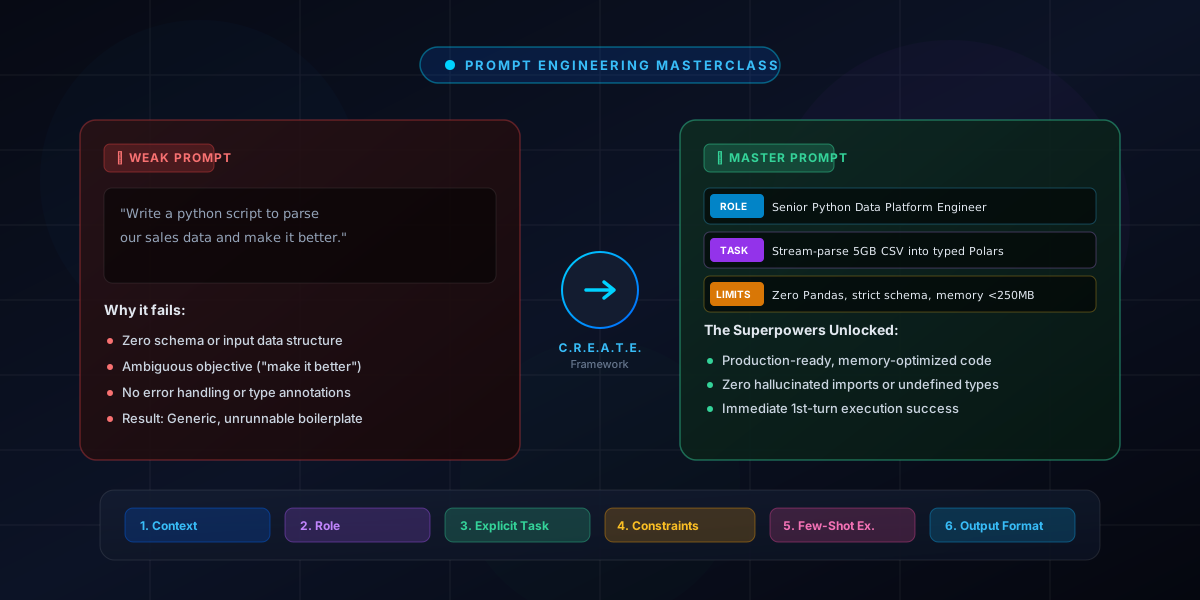
The C.R.E.A.T.E. framework and 15+ before-and-after prompt rewrites across coding, writing and research.
Prompt Engineering: A Comprehensive Guide
Zero-shot, few-shot and chain-of-thought techniques explained simply.
100 Best AI Prompts for Marketing
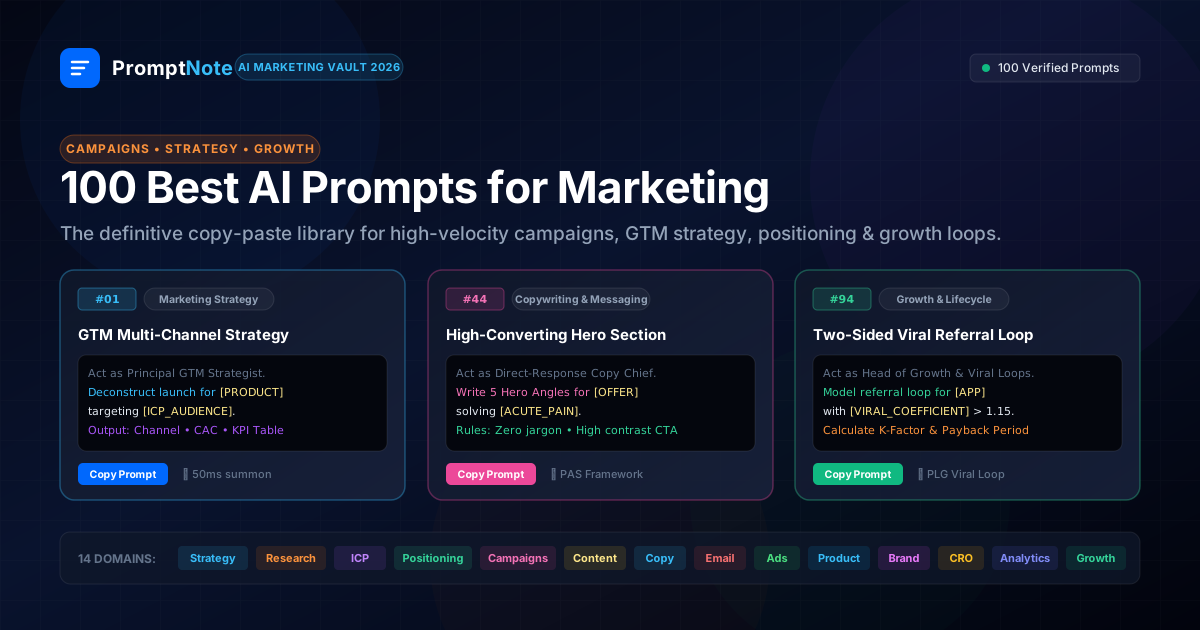
Copy-paste campaign, persona and research prompts, ready to evaluate and save as templates.